


Gemini Notebook
4.73.31K Reviews
App Specs
- Version
- Varies with Device
- Updated On
- License
- Free
- Downloads
- 10,000,000+
- Developer
- Google LLC
- Categories
- Productivity
- Platform
- Android, iOS
Screenshots
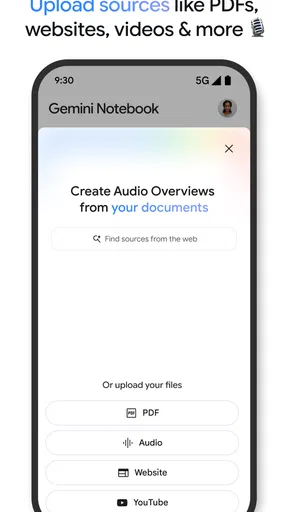
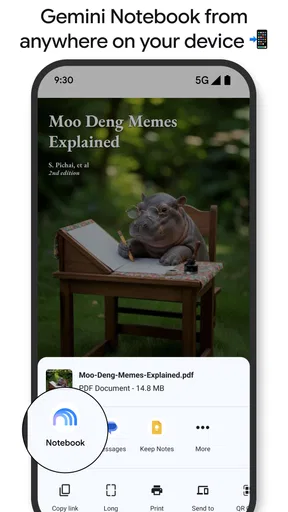
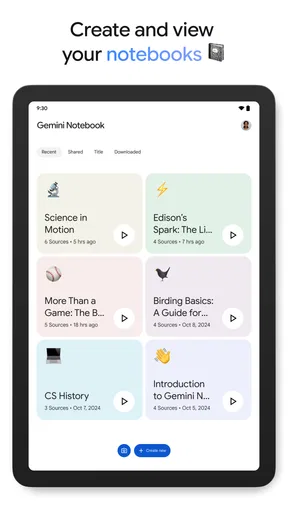
 Analysis by AppCompare
When useful information is scattered across reading, work, and personal notes, the hard part is often not finding more of it—it is remembering where it came from and turning it into something you can use. I find that this is the problem Google NotebookLM is meant to address: keeping a working set of material together so I can return to it, make sense of it, and ask better questions about it. That focus makes it different from a conventional blank-page notebook, though it also means it is not automatically the right home for every kind of note.
A better starting point than an empty notebook
I would approach NotebookLM as a research workspace rather than a place to capture every passing thought. Start with one specific subject or task, gather the material you already expect to use, and keep the scope manageable. A project with a clear boundary is easier to revisit than a catch-all space containing unrelated errands, recipes, meeting notes, and reading links.
That first decision has a practical payoff: it gives the assistant context. When I am working from a focused collection, questions can stay tied to the material I care about instead of becoming vague prompts that could apply to anything. I also find it useful to write down what I need to decide or understand before I begin. That turns a broad research session into a sequence of checks: what does the material say, what remains unclear, and which source should I look at next?
For example, if I were comparing options for a home project, I would keep the estimates, product documents, and my own notes together, then ask targeted questions about differences I need to verify. I would still open the relevant source before acting. The value is in narrowing the search and surfacing useful points, not in treating an AI answer as a substitute for reading important details.
Where it earns a place in a daily routine
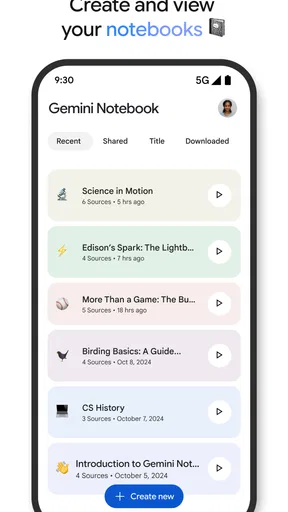
The most useful everyday case is a task that spans several documents and more than one sitting. Imagine I have a class assignment, a work proposal, or a long article to understand. I can return to the same body of material rather than reconstructing my train of thought from browser tabs and scraps of notes. That is a meaningful time-saver when the alternative is repeatedly searching for a particular passage or trying to remember which document contained it.
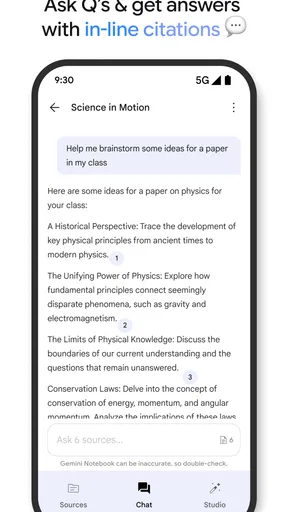
I would also use it to prepare for a conversation. If I collect the relevant background first, I can ask for the central themes or points that deserve follow-up, then make my own short list before a meeting or study group. This works best when I treat the generated response as a draft of my thinking. Checking a claim against its source is still important, especially if a decision, grade, or professional recommendation depends on it.
For ongoing projects, a small habit helps: add material because it supports a question, not simply because it might someday be useful. A growing pile can become a new kind of clutter. I would periodically remove sources that no longer belong to the task and keep a brief note about the project’s current question. That makes it easier to pick up again after a few days away.
Worth Reading Before You Choose

Baby Panda World Brings Quick Play to Modern Phones, but Its Game Library Feels Busy

ESPN’s Live Game View Makes Following Close Games Easier

QuizzLand Review: A Good Fit for Short Trivia Breaks, Not Every Player

Basketball Stars: Multiplayer Is Fast, but Can It Recover When Matches Go Wrong?

WEBTOON Turns Phone Updates Into a Better Reading Routine

Link to Windows Runs on Shared Habits, Not Social Feeds
What it does better than ordinary note apps
A standard notes app is often better for fast capture: jot down a reminder, save a phone number, or draft a thought before it disappears. A document editor is usually better when I already know what I want to write and need precise control over the finished page. NotebookLM makes more sense when the material already exists and the challenge is understanding, connecting, or revisiting it.
That distinction matters because no single tool needs to replace the others. I would keep quick personal reminders in whichever notes app I already reach for, use a document editor for polished writing, and bring a bounded set of reference material into NotebookLM when I need help working through it. This division avoids forcing an AI research tool to act like a universal filing cabinet.
It is also worth remembering that a fluent response can feel more certain than the source material warrants. I would check important figures, qualifications, and disagreements in the underlying documents rather than copying an answer straight into a final report. The more consequential the task, the more valuable that verification step becomes.
Who should try it—and who may not need it
I think the app is a strong fit for students, researchers, writers, and professionals who regularly work from a defined collection of information. It can also suit anyone who has to return to a topic over several days and wants a more direct route back into the material. Google LLC develops it, and its productivity focus is clear: the goal is to make research feel more manageable, not to turn every moment into note-taking.
If your notes are mostly short reminders or personal lists, a simpler notebook may be quicker and less distracting. If you need a carefully controlled archive, a formal citation workflow, or a finished document with exact formatting, a dedicated tool for that job may serve you better. I would also avoid relying on an AI summary as the sole record of a sensitive or high-stakes source; keep the original material close and make your own checks.
NotebookLM is free and rated for Everyone. It has an average rating of 4.8 from around 240,000 ratings, with over 10 million installs. Those figures suggest that it has found a broad audience, but the real question for me is whether its source-centered way of working matches the task I have in front of me.
Organize Like Never Before
If you're like me, you've probably tried a slew of note-taking apps, each with its own strengths and quirks. But what sets Google NotebookLM apart is its ability to seamlessly integrate with other Google services. It's like having your own personal librarian, ready to fetch and organize your thoughts and materials at a moment's notice.
One of the standout features is its AI-driven organization. The app can automatically categorize and tag your notes, so you're not left sifting through endless entries to find what you need. This smart organization is a lifesaver for those of us who tend to collect more information than we know what to do with.
Intuitive User Interface
The user interface is as intuitive as it gets. If you're already familiar with Google's ecosystem, you'll feel right at home. The design is clean and minimalistic, making it easy to focus on what truly matters: your content.
Adding and editing notes is a breeze. Just a couple of taps, and you can insert text, images, or even voice memos. It's evident that Google has put a lot of thought into the user experience, ensuring that even the most tech-challenged among us can navigate the app with ease.
Cross-Platform Syncing
In today's fast-paced world, being able to access your notes across multiple devices is crucial. With Google NotebookLM, your notes are always in sync, whether you're on your phone, tablet, or computer. This cross-platform capability ensures that you can pick up right where you left off, no matter where you are.
Moreover, the app integrates smoothly with Google Drive, allowing you to attach files and documents directly to your notes. This feature is invaluable for students and professionals alike, who often need to reference additional materials alongside their notes.
Enhanced Collaboration
In an era where collaboration is key, Google NotebookLM doesn't disappoint. You can easily share your notes with colleagues, classmates, or friends, making group projects and collaborative efforts a breeze. Real-time editing means everyone stays on the same page, literally and figuratively.
Sharing is as simple as sending a link, and you can control the access level of each participant, ensuring your notes remain secure and only accessible to those you choose.
Privacy and Security
Given the sensitive nature of digital note-taking, privacy and security are paramount. Google has incorporated robust security measures into Google NotebookLM, ensuring that your data stays safe from prying eyes. With end-to-end encryption and frequent security updates, you can jot down your thoughts with peace of mind.
Plus, with Google's reputation for reliable cloud storage, you won't have to worry about losing your notes due to device failures or accidental deletions.
Final Thoughts
In conclusion, Google NotebookLM is a powerful tool for anyone looking to streamline their note-taking process. Its seamless integration with the Google ecosystem, intuitive interface, and robust features make it a standout choice in a crowded market.
Whether you're a student, a professional, or simply someone who loves to keep track of ideas and information, this app offers a solution that feels both futuristic and familiar. So, why not give it a try? You might just find it to be the organizational ally you've been searching for.
Pros
- Seamless integration with Google Workspace.
- AI-powered organization for notes.
- User-friendly interface and design.
- Cross-platform accessibility.
- Advanced search functionality.
Cons
- Limited offline capabilities.
- Requires a Google account.
- Occasional syncing delays.
- No handwriting recognition.
- Limited customization options.
FAQs for Gemini Notebook
What is Google NotebookLM and how does it work?
Google NotebookLM is an AI-powered note-taking application designed to enhance your productivity by helping you organize and manage your notes efficiently. It integrates machine learning to offer smart categorization, search functionalities, and personalized suggestions. Users can quickly find and group related notes, making it easier to stay organized and focused.
Is Google NotebookLM available on both Android and iOS?
Yes, Google NotebookLM is available for download on both Android and iOS platforms. The app is designed to work seamlessly across different devices, ensuring that you can access your notes anytime, anywhere. It synchronizes your data across platforms, so all your notes are always up-to-date.
How secure is Google NotebookLM for storing sensitive information?
Google NotebookLM employs robust security measures to protect your data, including encryption and secure login processes. However, it is advisable to avoid storing highly sensitive information, such as passwords or personal identification numbers, within the app. Regular updates ensure that security features remain up-to-date.
Can I collaborate with others using Google NotebookLM?
Yes, Google NotebookLM offers collaboration features that allow you to share notes and work collaboratively with others. You can invite colleagues or friends to view or edit notes, making it ideal for group projects or shared lists. Real-time updates ensure everyone is on the same page.
What are the system requirements for Google NotebookLM?
To run Google NotebookLM efficiently, your device should have a recent version of Android or iOS installed. The app is optimized for modern devices, requiring at least Android 8.0 or iOS 12.0. Ensure your device has enough storage and processing power for a smooth experience.


